Trademaxxing part3 : Testing our ITCH Parser
Introduction
In the last post I presented you the basics of an ITCH Parser FSM and we stopped when we had a basic parser able to parse a premade ‘A’ order and commit basic state changes (even though we still don’t have a state to change but that will come later).
But before moving on, we need to have solid support of the following ITCH events :
- R (to know the stock locate when the trading day starts)
- A, F (add orders)
- D (delete orders)
- X, E, C (cancel or execute orders)
- U (replace orders)
What Changed in Between Now and the Last Post ?
Just a small parenthesis with some small facts:
- I added a
DRAINstate as my primary “problem handler” which handles edge cases and exceptions by just letting the frame pass without considering it nor affecting saved market state (never goes throughCOMMIT) - I decided to actually implement the R message as not all events carry the stock symbol, this is something I did not make very clear in the last post. The R event will add some exclusive states (90% bloat) but is necessary to figure out the locate.
Testbench Concept
As stated in the previous post that featured a very basic TB (TestBench), we use the following stack:
- Cocotb (python assertions and value sets)
- Cocotbext.eth A cocotb library that auto-generates ethernet RGMII signals so we don’t have to, huge time saver + robustness booster.
- Verilator (raw simulator backend)
I also use GTKWave to visualize waveforms but you probably don’t care.
The idea is to stop using a single pre-tailored ethernet frame message and start using real ITCH5.0 feeds.
Nasdaq does provide such binary files, but they are HUGE (8GB lol) and I don’t really know how to parse them, and learning to parse them correctly would not be that hard but designing a software parser does feel like a loss of time when our objective is to design hardware.
BUT THERE IS A SOLUTION to save the day:
1
pip install itchfeed
itchfeed is a python library that parses incoming feeds or feeds from files for analysis. We kinda don’t care about that because what we want is to do :
***.NASDAQ_ITCH50 (raw market data bin file) -> a python object we can manipulate -> a stream of bytes into an ethernet frame -> into DUT using cocotbext.eth
And that’s exactly what it does ! which is great. I’ll let you read its simple yet lifesaving docs if you are interested : link.
With all the tools in mind, here is what the TB flow looks like:
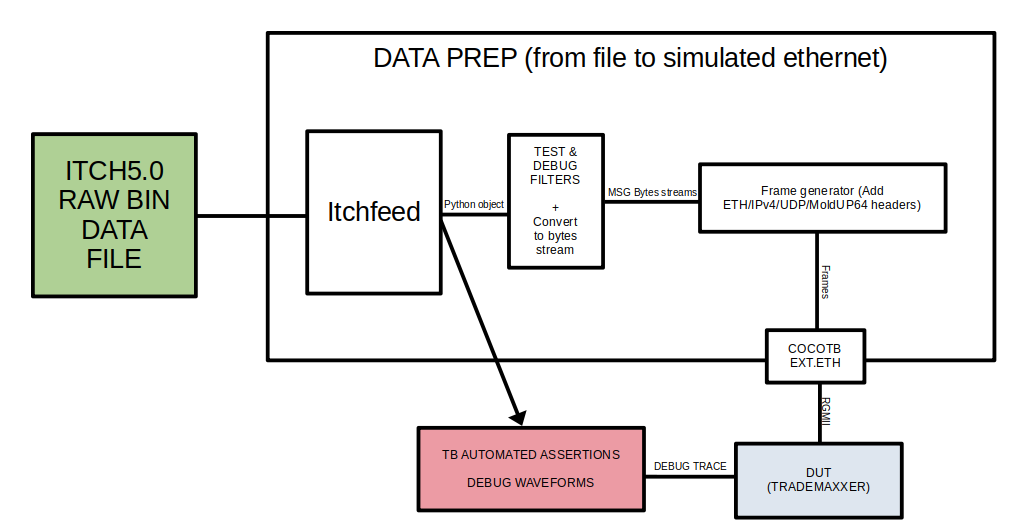
No need to compliment my libreoffice-draw skills, I already know how great these are.
So that’s pretty much the whole thing, what remains is to actually code the cocotb testbench, figure out how itchfeed works etc…
The great thing with cocotb is that it unlocks such great possibilities; apart from the fact it saves you HOURS to build testbenches (especially with extensions !), python makes it so easy to AUTOMATE AND DEBUG.
This way, I can make multiple test cases, here is what I went for in this little demo project:
- One test with the handmade fixed frame (automated with assertions and all that jazz), this test’s role is to raise the red flag whenever new changes break something important in the stream flow through the DUT. It runs various assertions to verify the data flows correctly.
- Another BEEFY test that parses the ITCH market data file, turns them into ethernet frames and feeds it to the DUT so I can see what comes out. Better yet, I can FILTER and/or intervene directly on frame data. Which helps a ton for debugging.
e.g. I’m implementing R messages as I write these lines, and with python, I can just filter out frames that are not “R” so I can easily isolate my DUT behavior in this specific case.
1
2
3
4
5
6
7
8
9
10
11
12
13
14
15
16
17
18
19
20
21
22
23
24
25
26
27
28
29
30
31
32
33
34
35
36
37
with open(ITCH_FILE, 'rb') as itch_file:
    for message in parser.parse_file(itch_file):

        # Learn AAPL locate code from Stock Directory
        if (isinstance(message, StockDirectoryMessage)
                and message.stock.decode().strip() == "AAPL"):
            AAPL_locate = message.stock_locate

        # Filter: only supported message types
        if (not isinstance(message, AddOrderNoMPIAttributionMessage)
                and not isinstance(message, AddOrderMPIDAttribution)
                and not isinstance(message, OrderExecutedMessage)
                and not isinstance(message, OrderExecutedWithPriceMessage)
                and not isinstance(message, OrderCancelMessage)
                and not isinstance(message, OrderDeleteMessage)
                and not isinstance(message, OrderReplaceMessage)):
            continue

        # Filter: AAPL only
        if message.stock_locate != AAPL_locate:
            continue

        # Experimental debug filters
        if message.message_type != b"E":
            continue

        # Serialize + print
        raw_bytes = message.to_bytes()
        print(f"Type={message.message_type} "
            f"Locate={hex(message.stock_locate)} "
            f"Tracking={hex(message.tracking_number)} "
            f"Timestamp={hex(message.timestamp)} "
            f"raw={raw_bytes.hex()}")

        # Build a frame from that and feed it to the DUT...

        # assertions can also be run later on
These things take time and are not as intuitive in old school testbenches.
Testbench Outputs
I then shape the frames however I want. Of course I strictly stick to the specs. The only freedom I have is on the number of messages I pack in a single frame, I chose to pack 3 each time.
Here is the TB at work when implementing "E" message support:
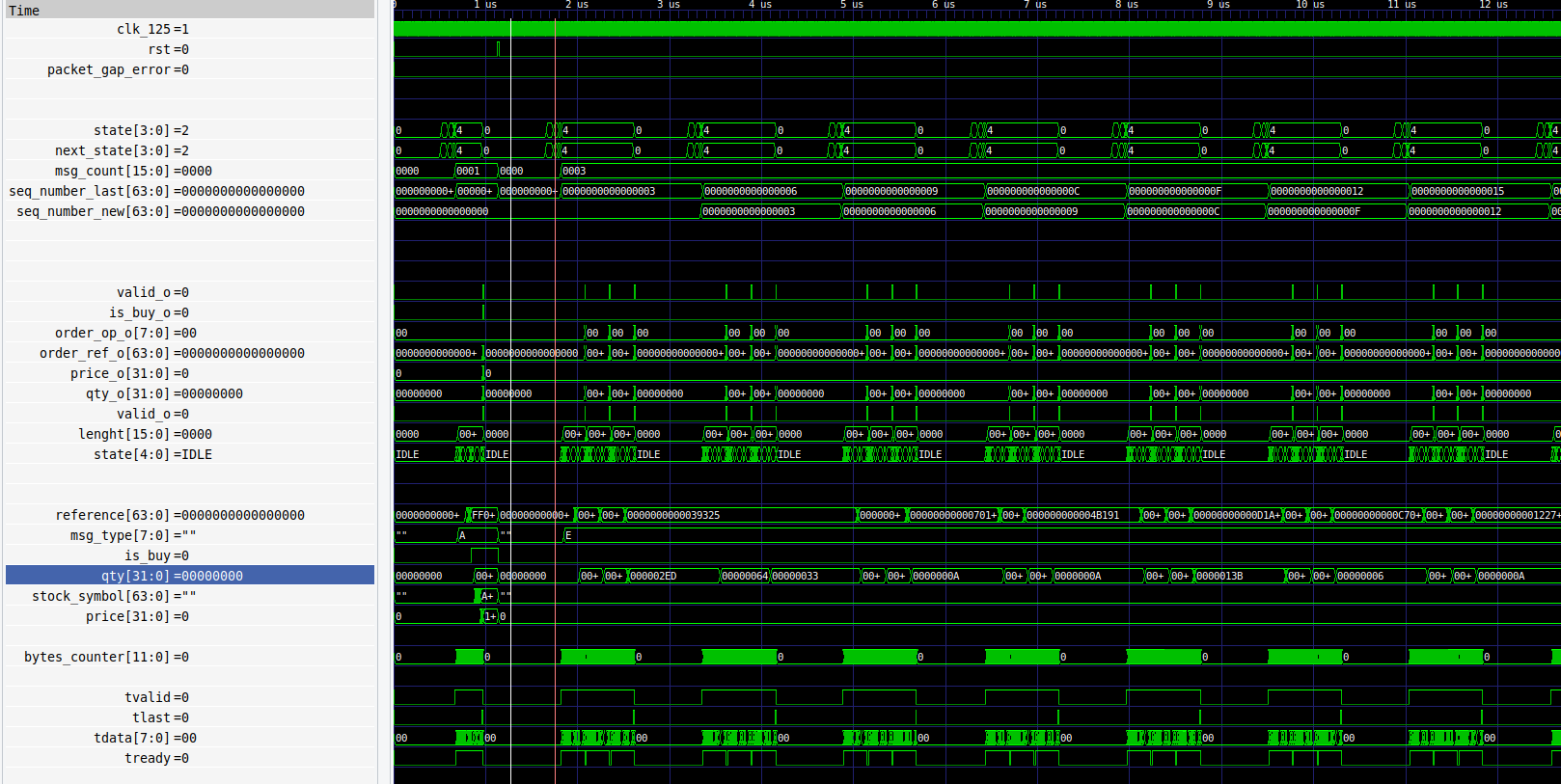
The delay between frames is added manually for easier debugging.
And here is a full blast testbench, with all message types (most of the messages are A and D lol) :
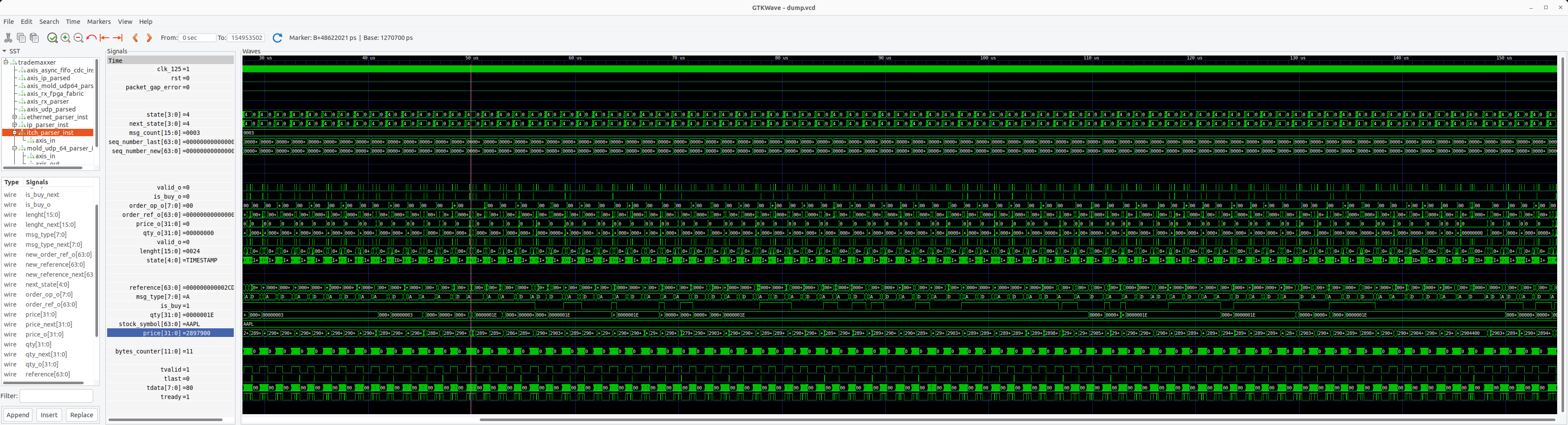
It does look good and satisfying ngl !
Takeaways
Parsing ITCH is a challenge, but it’s not really a terribly difficult one, yes it’s not trivial but it’s definitely something a junior could do with some adaptation time.
I think the real challenge moving forward would be to implement the “missing stuff” logic (if the MoldUDP parser detects problems), make the orders list and price ladder properly, as well as implementing a real financial strategy.
But these things are exactly what real engineers get paid for so I’m not gonna make that here on my own lol (especially the strategy part, I’ll let you take a guess on “why?”). In the future, I’ll just run a basic bookkeeping demo, as stated in the previous post in order to avoid tackling too complex problems that are above my nonexistent paygrade.
Also, COCOTB is insanely good for productivity. Verification is what takes most of the time. Usually in demos like these, you’ll see that people won’t even bother to verify much as it is the most time-consuming part, and a big part of it is just setting up the said test !
But here I can verify my design decently in very small timeframes (just check out the publish dates on these posts lol).
Thank you for reading to this point. You can write a comment below if you have any questions.
Godspeed
-BRH